VS Code Extension
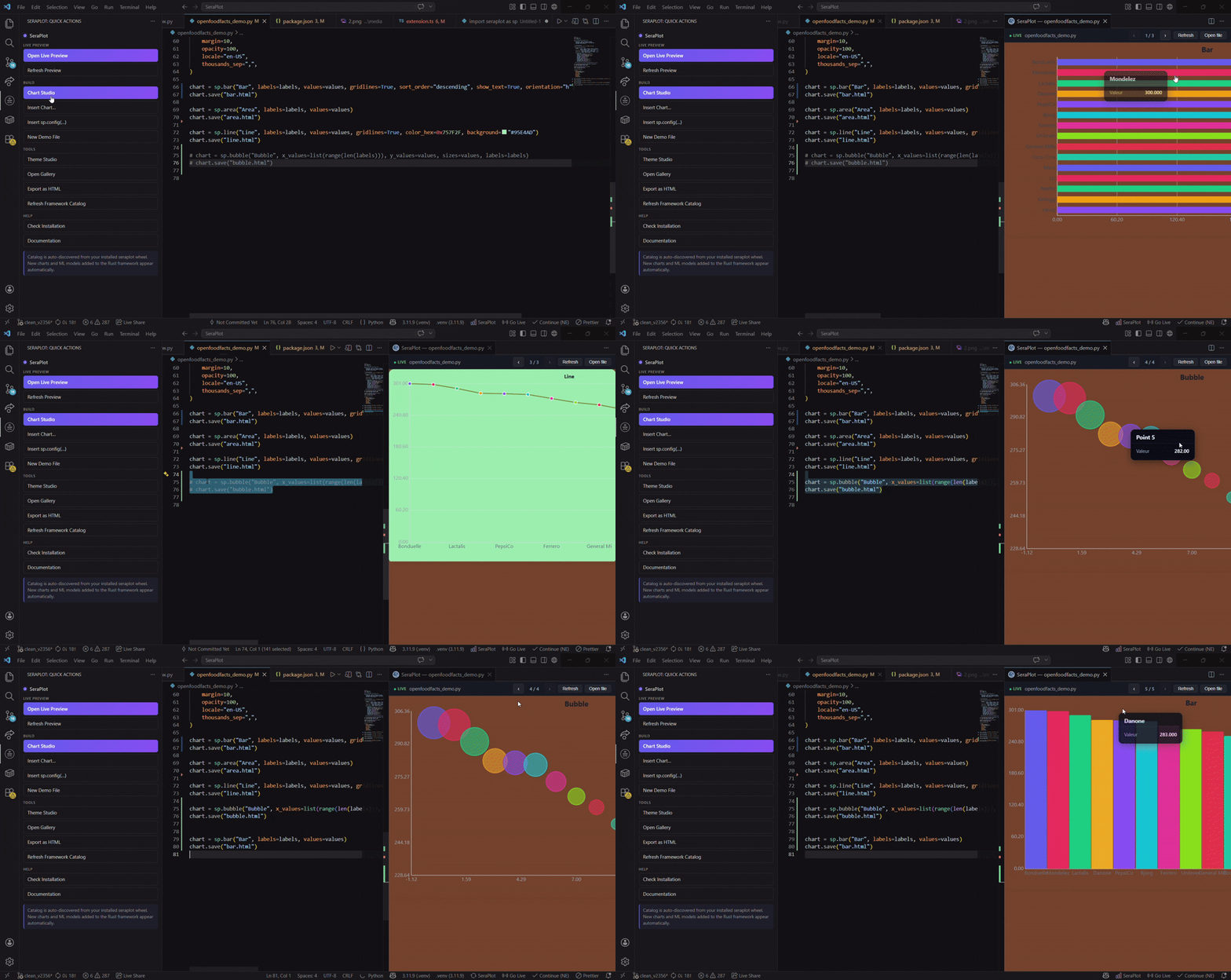
Official SeraPlot extension for Visual Studio Code — live preview, theme studio, snippets and a chart gallery.
Marketplace: https://marketplace.visualstudio.com/items?itemName=feur25.seraplot-vscode
Install
From the command palette or terminal — no browser needed:
ext install feur25.seraplot-vscodeOr from the Extensions view Ctrl+Shift+X, search SeraPlot:
Open in VS Code Marketplace →seraplot.pythonPath. Works on Windows, macOS and Linux.
Download the .vsix from the GitHub releases page, then install via terminal:
code --install-extension seraplot-vscode-0.6.1.vsixOr drag the .vsix file directly into the VS Code Extensions panel.
Commands
| ID | Title | Description |
|---|---|---|
seraplot.preview | SeraPlot: Live Preview | Render every sp.Chart of the current Python file in a side panel and refresh on save |
seraplot.themeStudio | SeraPlot: Open Theme Studio | Pick a palette + background, copy the generated sp.set_global_background(...) snippet |
seraplot.gallery | SeraPlot: Open Gallery | Browse all chart families with thumbnails and one-click code samples |
The Live Preview button also appears in the editor title bar for any .py file.
Snippets
| Prefix | Description |
|---|---|
seraplot-import | import seraplot as sp |
seraplot-bar | Minimal bar chart |
seraplot-scatter | Scatter chart |
seraplot-dashboard | 2x2 grid layout |
seraplot-automl | sp.auto_classify(...) skeleton |
seraplot-drift | sp.drift_detect(...) skeleton |
Settings
| Key | Default | Description |
|---|---|---|
seraplot.pythonPath | python | Python interpreter used to render previews |
seraplot.autoReload | true | Re-render on save |
Set seraplot.pythonPath to your project venv, e.g.
${workspaceFolder}/.venv/Scripts/python.exe on Windows or
${workspaceFolder}/.venv/bin/python on macOS / Linux.
How the preview works
- The active
.pyfile is executed viarunpy.run_pathin a child Python process usingseraplot.pythonPath. - Every
sp.Chartinstance found in the module globals is exported withsp.export_html(chart). - The HTML is concatenated and rendered inside a VS Code Webview panel.
- With
seraplot.autoReload = truethe panel re-runs automatically when the file is saved.
The preview is sandboxed in a Webview — no network access, no
eval. Charts are CSP-safe (seeconfig/csp.md).
Source
Repository: https://github.com/feur25/seraplot — folder seraplot-vscode/.
License: MIT.
Extension officielle SeraPlot pour Visual Studio Code — aperçu en direct, theme studio, snippets et galerie de graphiques.
Marketplace : https://marketplace.visualstudio.com/items?itemName=feur25.seraplot-vscode
Installation
Depuis la palette de commandes ou un terminal — sans navigateur :
ext install feur25.seraplot-vscodeOu depuis la vue Extensions Ctrl+Shift+X, cherchez SeraPlot :
Ouvrir dans le Marketplace VS Code →seraplot.pythonPath. Fonctionne sur Windows, macOS et Linux.
Téléchargez le .vsix depuis la page des releases GitHub, puis installez via le terminal :
code --install-extension seraplot-vscode-0.6.1.vsixOu glissez-déposez le fichier .vsix directement dans le panneau Extensions de VS Code.
Commandes
| ID | Titre | Description |
|---|---|---|
seraplot.preview | SeraPlot: Live Preview | Affiche tous les sp.Chart du fichier Python courant dans un panneau et rafraîchit à la sauvegarde |
seraplot.themeStudio | SeraPlot: Open Theme Studio | Choisir une palette + un fond, copier le snippet sp.set_global_background(...) généré |
seraplot.gallery | SeraPlot: Open Gallery | Parcourir toutes les familles de graphiques avec aperçus et exemples de code en un clic |
Le bouton Live Preview apparaît également dans la barre de titre de l'éditeur pour tout fichier .py.
Snippets
| Préfixe | Description |
|---|---|
seraplot-import | import seraplot as sp |
seraplot-bar | Graphique en barres minimal |
seraplot-scatter | Nuage de points |
seraplot-dashboard | Grille 2×2 |
seraplot-automl | Squelette sp.auto_classify(...) |
seraplot-drift | Squelette sp.drift_detect(...) |
Paramètres
| Clé | Défaut | Description |
|---|---|---|
seraplot.pythonPath | python | Interpréteur Python utilisé pour les aperçus |
seraplot.autoReload | true | Re-rendu à chaque sauvegarde |
Pointer seraplot.pythonPath vers le venv du projet, par exemple
${workspaceFolder}/.venv/Scripts/python.exe sous Windows ou
${workspaceFolder}/.venv/bin/python sous macOS / Linux.
Fonctionnement de l'aperçu
- Le fichier
.pyactif est exécuté viarunpy.run_pathdans un processus Python enfant utilisantseraplot.pythonPath. - Chaque instance
sp.Charttrouvée dans les globales du module est exportée avecsp.export_html(chart). - Le HTML est concaténé et rendu dans un panneau Webview de VS Code.
- Avec
seraplot.autoReload = true, le panneau se relance automatiquement à chaque sauvegarde du fichier.
L'aperçu est sandboxé dans un Webview — pas d'accès réseau, pas d'
eval. Les graphiques sont CSP-safe (voirconfig/csp.md).
Code source
Dépôt : https://github.com/feur25/seraplot — dossier seraplot-vscode/.
Licence : MIT.